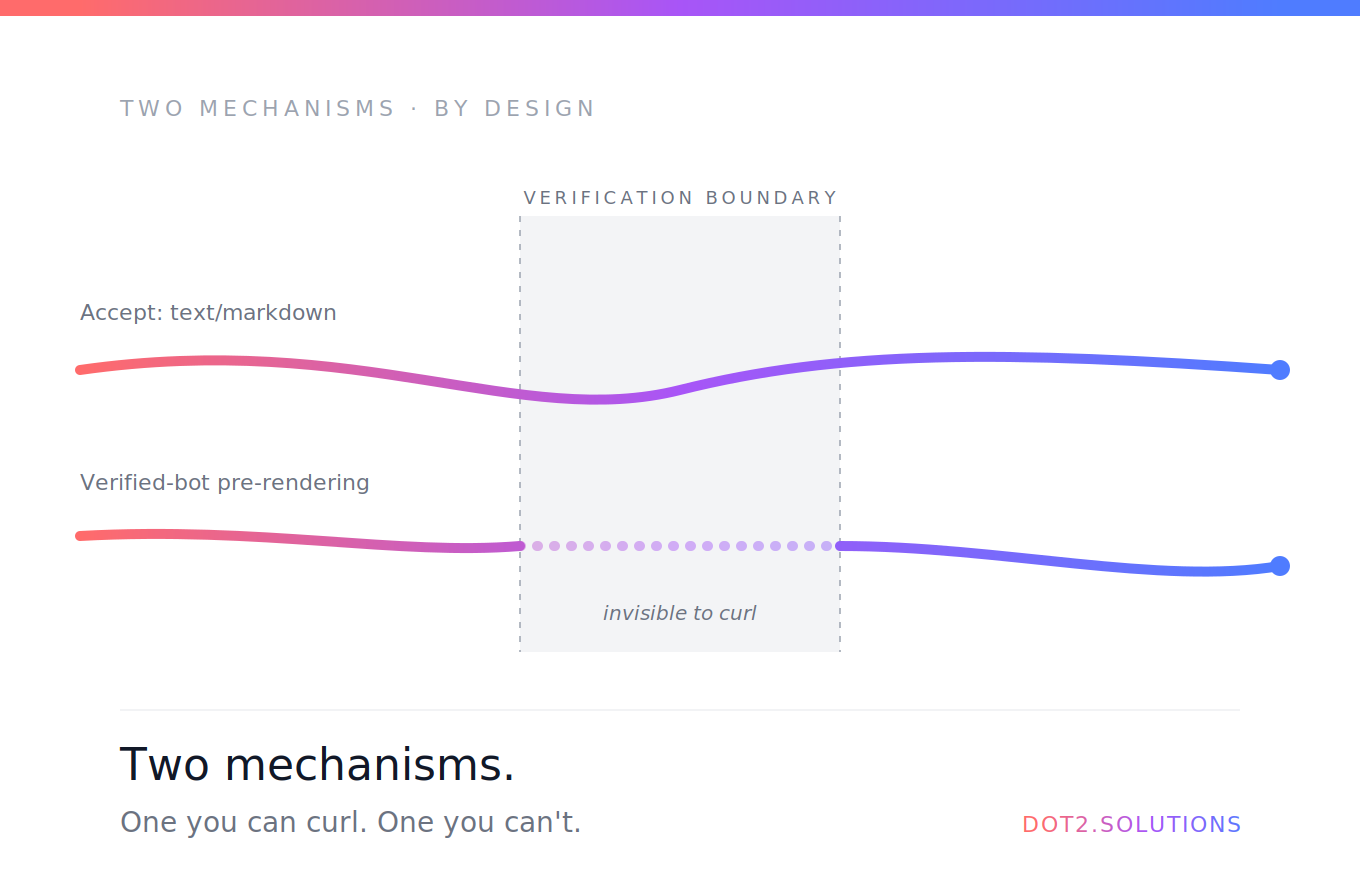
Der Lovable-SEO-Realitätscheck: Was ich beim Bauen von dot2.solutions gelernt habe
Ein Bericht aus erster Hand, in dem ich gegen jede SEO-Wand laufe, die eine Lovable-App treffen kann — und was sie wirklich behebt. Von doppelten Canonicals bis zu kaputten OG-Bildern: das ehrliche Audit.

Chris
March 15, 2026 · 14 min read
Ask AI about this post



Ein Bericht aus erster Hand, in dem ich gegen jede SEO-Wand laufe, die eine Lovable-App treffen kann — und was sie wirklich behebt.
Ich bin Top-1-%-Lovable-Entwickler. Ich habe über 1,1 Millionen Zeilen Code auf der Plattform ausgeliefert. Ich liebe es ehrlich, damit zu bauen.
Und meine eigene Website hatte monatelang 5 Seiten in der Google Search Console mit „Duplikat ohne vom Nutzer gewähltes Canonical“ markiert.
Dieser Artikel ist alles, was ich beim Beheben gelernt habe — und das ehrliche Eingeständnis, was ich nicht beheben konnte.
Zuerst: Was Lovable tatsächlich baut
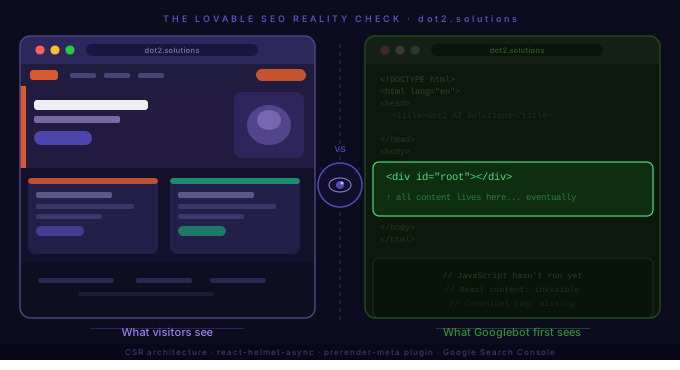
Lovable generiert React-+-Vite-Anwendungen. Das heisst, jede produzierte Site ist eine Client-Side-Rendered (CSR) Single-Page-App (SPA).
Praktisch heisst das: Wenn ein Crawler — Google, LinkedIn, ChatGPT, Perplexity — eine URL deiner Site abruft, liefert jede Seite Folgendes:
<!DOCTYPE html>
<html>
  <head>
    <title>Titel deiner Seite</title>
    <!-- dieselben Meta-Tags für jede Route -->
  </head>
  <body>
    <div id="root"></div>
  </body>
</html>
Der eigentliche Seiteninhalt — Überschriften, Texte, Canonical-Tags — existiert erst, nachdem React gebootet hat und JavaScript im Browser läuft. Für menschliche Besucher ist das nahtlos. Für Crawler entstehen echte Probleme.
Das ist keine Kritik an Lovable. Das ist die Architektur. Sie zu verstehen ist Voraussetzung für alles Weitere in diesem Artikel.
Die drei Crawler-Probleme, die das erzeugt
1. Googles zweistufiger Crawl führt zu Indexierungsverzögerungen
Google verarbeitet CSR-Sites in zwei Schritten:
- Stufe 1: initiales HTML crawlen (sieht die leere Shell)
- Stufe 2: später zurückkommen, JavaScript rendern und den echten Inhalt erfassen
Stufe 2 ist verzögert, depriorisiert und nicht garantiert schnell. Für eine neue Seite können das Tage oder Wochen bis zur sauberen Indexierung sein.
2. Social-Plattformen und KI-Crawler sehen nichts
LinkedIn, Twitter/X, Facebook, ChatGPT, Perplexity — keiner führt JavaScript aus. Wenn jemand auf LinkedIn einen Link zu deinem Blogpost teilt, holt die Plattform die URL für die Vorschau, bekommt deine leere Shell und zeigt entweder generische Infos oder nichts.
Das zählt mehr, als die meisten Lovable-Builder denken. Deine Open-Graph-Tags, sauber via react-helmet-async gesetzt, sind für Social-Crawler komplett unsichtbar.
3. react-helmet-async-Canonicals kommen zu spät
Mein SEO-Setup sah korrekt aus. Ich hatte SEOHead-Komponenten auf jeder Seite, die per react-helmet-async eindeutige Title, Beschreibungen und Canonicals injizierten. Google Search Console markierte trotzdem 5 Seiten als „Duplikat ohne vom Nutzer gewähltes Canonical“.
Warum? Weil diese Canonicals von JavaScript injiziert werden — Googles erster Crawl jeder Seite sieht dieselbe HTML-Shell mit dem Basistitel aus index.html und keinem seitenspezifischen Canonical. Google sieht 10 Seiten, die alle gleich aussehen, und markiert sie als Duplikate.
Was ich auf meiner eigenen Seite kaputt vorgefunden habe
Hier das Audit von dot2.solutions — ehrlich und ungefiltert:
❌ Relative Pfade bei OG-Bildern in der index.html
<!-- Was ich hatte — für Social-Crawler kaputt -->
<meta property="og:image" content="/lovable-uploads/image.png" />

<!-- Was es sein sollte -->
<meta property="og:image" content="https://dot2.solutions/lovable-uploads/image.png" />
Social-Crawler lösen keine relativen Pfade auf. Jeder Share meiner Homepage erzeugte eine kaputte Vorschau. Einzeiler-Fix, grosser Effekt.
❌ Falsches Default-ogImage in der SEOHead-Komponente
Meine SEOHead-Komponente hatte als Default:
ogImage = '/lovable-uploads/meet-fin3.webp'Das ist ein Blogpost-Bild — ein Foto zu Fin — das als Social-Preview für jede Seite verwendet wurde, die kein eigenes Bild gesetzt hat. Meine Pricing-Seite, Lokalisierungs-Seite und Kontaktseite teilten alle ein Fin-Artikelbild auf LinkedIn.
❌ Schema-Duplikate
Ich hatte umfassendes JSON-LD-Schema in der index.html — Organization, LocalBusiness, Service. Ich hatte zusätzlich eine StructuredData-Komponente, die auf verschiedenen Seiten verwendet wurde. Auf jeder Seite mit gleichen Schema-Typen sah Googlebot Duplikat-Schemata.
Der Fix: Organization und LocalBusiness in die statische index.html (sitewide Identitäts-Signale, die jeder Crawler sehen muss). Die Komponente nur für seiten-spezifische Schemata — Article bei Blogposts, Service auf Servicepages, FAQPage, wo passend.
❌ Kein statisches Canonical in der index.html
Meine index.html hatte einen Kommentar, dass Canonicals „pro Seite von der SEOHead-Komponente überschrieben werden“ — aber keinen statischen Fallback. Für die Homepage und für alle Crawler ohne JS gab es im statischen HTML gar kein Canonical.
<link rel="canonical" href="https://dot2.solutions/" /> direkt in die index.html zu ergänzen, ist eine einfache Mitigation.
❌ Fehlende KI-Bot-Direktiven in der robots.txt
Meine robots.txt hat Googlebot und Bingbot abgedeckt, aber nichts für KI-Crawler. Da GEO (Generative Engine Optimization) immer relevanter wird, war das ein Versäumnis. Ergänze explizite Einträge:
User-agent: GPTBot
Allow: /

User-agent: PerplexityBot
Allow: /

User-agent: Claude-Web
Allow: /
Die Fixes, die wirklich in Lovable funktionieren
Alle umsetzbar, ohne die Plattform zu verlassen. Schritt-für-Schritt-Anleitungen und einsatzfertige Prompts in meinem SEO-Setup-Guide für Lovable-Apps im Help Center.
- Absolute URLs für alle OG-Bilder — sowohl in der
index.htmlals auch als Default-Fallback in deiner SEOHead-Komponente. - Ein gebrandetes Default-ogImage — nutze deine echte Social-Card als Fallback, kein zufälliges Blogpost-Bild.
- og:site_name und og:locale — in SEOHead ergänzen:
<meta property="og:site_name" content="Name deiner Seite" /> <meta property="og:locale" content="de_CH" /> - Statisches Canonical in der index.html — mindestens für die Homepage.
- KI-Crawler-Direktiven in der robots.txt — explizites Allow für GPTBot, PerplexityBot, Claude-Web.
- Trennung der Schema-Scopes — sitewide Schemas statisch in der
index.html, seiten-spezifische Schemas nur via Komponente. - Build-Time Meta-Tag-Injection — die, die ich tatsächlich ausgeliefert habe. Drei Dateien machen es aus:
scripts/prerender-meta.ts— ein eigenes Vite-Plugin, das beim Build läuft,dist/index.htmlin routen-spezifische Verzeichnisse kopiert und korrekte<title>,<meta name="description">,<link rel="canonical">und OG/Twitter-Tags pro Route injiziertscripts/prerender-routes.ts— Route-Metadaten-Config, auto-generiert (siehe unten)vite.config.ts— angepasst, um das Plugin einzubinden
Beim Build erzeugen Lovables Server Dateien wie dist/intercom-expert/index.html und dist/blog/ai-agents/index.html — jeweils mit eindeutigen Meta-Tags, fest ins statische HTML gebrannt. Googlebot sieht die Canonical-Tags sofort, ohne JavaScript.
Der Punkt, der es wartbar macht: ein Skript scripts/generate-prerender-routes.ts liest alle Blogpost-Datendateien, extrahiert id, title und excerpt und regeneriert prerender-routes.ts automatisch. Es läuft als prebuild-npm-Skript — neue Blogposts werden ohne manuelle Config in den Routen synchron gehalten.
Den leeren <div id="root">-Body fixt es nicht — den übernimmt React weiterhin client-seitig. Aber es zielt direkt auf das „Duplikat ohne vom Nutzer gewähltes Canonical“-Problem aus der Search Console.
Die Fixes, die das Verlassen von Lovable verlangen
Sei ehrlich zur Decke.
Was Build-Time Meta Injection NICHT fixt: Dein Seiten-Body bleibt im statischen HTML ein leerer <div id="root">. Google muss weiter JavaScript ausführen, um echten Content zu sehen. Die zweistufige Crawl-Verzögerung bleibt. Für eine inhaltsstarke Seite, deren Hauptkanal organische Suche ist, ist das eine reale Grenze.
Was es fixt: das „Duplikat ohne Canonical“-Problem in Search Console — genau, weil dieser Fehler darum geht, dass Google im statischen HTML vor dem JS-Lauf keine Canonicals sieht. Mit dem Plugin bekommt jede Key-Route ihr eigenes HTML-File mit dem richtigen Canonical eingebrannt. Ich beobachte das in Search Console über die nächsten 4–6 Wochen, um zu bestätigen, dass die markierten Seiten in „indexiert“ wechseln.
Der Cloudflare-Worker-+-Prerender.io-Ansatz: Ich habe es geprüft. Berichte aus der Praxis zeigen DNS-Instabilität nach wenigen Stunden — man landet wieder bei A-Records und umgeht das ganze Setup. Für eine produktive Consultancy-Seite sind sporadische Downtimes ein grösseres Problem als langsame Indexierung.
Die Framer-Migrationsroute: Framer löst das SSR-Problem elegant für reine Marketing-Seiten. Aber wenn deine Lovable-App Supabase-Backend, Auth-Flows, Kundenportale oder andere Dynamik hat — Framer kann das nicht. Du hättest zwei Codebases zu pflegen.
💡 Die ehrliche Empfehlung
Für die meisten Lovable-Builder ist der richtige Move:
- Alle Fixes oben in Lovable umsetzen
- Deinen Blog auf Ghost verschieben, wenn Content-SEO fürs Geschäft zählt
Ghost handhabt SSR nativ, ist für Content gebaut, und der Blog ist genau dort, wo Googles Crawl-Verzögerung am stärksten wehtut. Deine App bleibt in Lovable, wo sie hingehört.
Was Lovable beim SEO gut macht
Ich möchte das nicht rein kritisch lesen lassen — vieles macht Lovable richtig:
- llms.txt-Support — ich habe
llms.txtundllms-full.txtauf dot2.solutions umgesetzt. Das ist für GEO und KI-Crawler-Sichtbarkeit ehrlich vorne. - Sauberes URL-Routing — React Router erzeugt automatisch saubere, sprechende URLs.
- Semantisches HTML — Lovable generiert konsistent saubere
<main>-,<nav>-,<section>-Strukturen. - Performance — Vite-Builds sind schnell. Core Web Vitals tendieren gut.
- Flexibilität — SEOHead-Pattern, StructuredData-Komponente und
robots.txt-Konfig geben dir echten Hebel innerhalb der CSR-Grenzen.
Für eine Consultancy wie meine, deren Akquise primär über LinkedIn, die Intercom-Community und Empfehlungen läuft — nicht über organische Suche — sind die CSR-Limits handhabbar. Für ein content-first Business, in dem SEO der Hauptkanal ist, sind sie deutlicher.
Die Checkliste
Bevor du eine Lovable-Site shippst, prüfe jedes davon (oder nutze den vollständigen SEO-Setup-Guide für Implementierungsdetails):
Die breitere Lektion
In Lovable zu bauen ist schnell. Diese Geschwindigkeit hat einen Trade-off — du shippst standardmässig CSR, und CSR hat bekannte SEO-Grenzen, die keine react-helmet-async-Konfiguration vollständig löst.
Das ist kein Grund, Lovable zu meiden. Es ist ein Grund, mit realistischen Erwartungen reinzugehen, jede verfügbare Mitigation umzusetzen und bewusste Entscheidungen zu treffen, wo dein Content tatsächlich liegt.
Meine Seite rankt weiterhin. Meine Blogposts werden indexiert. Die Search-Console-Warnungen werden besser. Ich tue aber auch nicht so, als wäre die Architektur unsichtbar.
Bau schnell. Shippe oft. Aber wisse, worauf du baust.
Baust du mit Lovable und brauchst Experten-Begleitung?
Als Top-1-%-Lovable-Entwickler mit 1,1M+ ausgelieferten Zeilen helfe ich Teams zu produktionsreifen Ergebnissen — von SEO-Architektur bis zu komplexen Integrationen. Ob ganzer Build oder Code-Review: lass uns sprechen.
Unsere Lovable-Expert-Services ansehen →Christopher Boerger ist Gründer von dot2.solutions, einer Schweizer Beratung für KI-Support-Automation mit Schwerpunkt Intercom-Fin-AI-Deployment und Wissensbasis-Architektur. Top-1-%-Lovable-Entwickler.
Häufig gestellte Fragen
Noch Fragen?
Wo das in unsere Arbeit passt
Konkrete nächste Schritte, wenn dieser Artikel zu Ihrem Vorhaben passt.
Share this article
Building on Lovable? Let's Talk.
As a top-ranked Lovable expert, we help teams ship production-grade web apps — SEO, GEO, and SSR done right from day one.
No commitment required • Free 30-minute consultation • Expert guidance